...

Bug Hunting

Learning about bug hunting in Python can help you develop problem-solving skills and an understanding of how to find and fix errors in your own code.
As part of this project you will learn:

Python Syntax

Let's review the python syntax

Python syntax is the rules we follow when we write code in Python. It helps us communicate with the computer and tell it what to do.

There are a few special things to remember:

Variables

  • In Python, a variable is like a container or a box that can hold different types of information.
  • It has a name and a value.
  • We can think of it as a way to store and remember things.

    The Colon

  • The colon : is a special symbol that tells Python that something important is coming next.
  • We use the colon before starting a for or while loop or if/else statements.
  • It's like saying, "Here comes a block of code!"
  • Quotes "" or ''

  • Quotes are used to represent text in Python.
  • They always come in pairs.
  • We use quotes to tell the computer that something is a piece of text, like a message or a name.
  • In print() statements, we put the text inside quotes to tell Python to show that message on the screen.

    Brackets (), []

  • Brackets always come in pairs.
  • We use round brackets () in commands like print() or getting input().
  • For example:
     print("Hello")
    or
    input("What's your name?")
  • Square brackets [] are used to define lists or arrays.
  • They help us keep things organised, like putting objects in a box.
  • Data Types

    In Python, we often need to work with different types of data, such as numbers and text. To make our code understand and handle these different types correctly, we use special functions or operators.
    String
    str() function: When we want to convert a number into text (a string), we use the str() function. It helps us represent numbers as words or combine them with other text.
    Integer

    int() function/operator: On the other hand, if we have text (a string) and we want to use it as a number for calculations, we can convert it into a number using the int() function/operator.

    Indentation

  • Indentation is like the way we organise our toys or books.
  • It helps the computer understand which lines of code belong together.
  • In Python, we use spaces or tabs to indent our code.
  • When we start a new block of code, like inside a loop or a function, we indent the code by adding spaces or tabs at the beginning of each line. It's like giving those lines a special place.
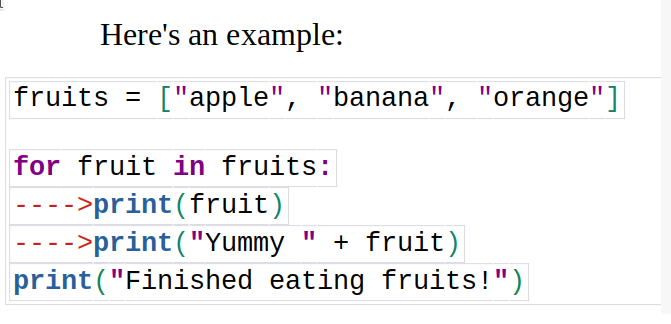
    We should set indentation:

  • In loops: When we have a loop, like a for loop or a while loop
  • In conditional statements: When we have an if statement or an else statement.
  • We shift code after using a colon : in loops and conditional statements
  • Next
    Please ensure all required fields are filled in
    What is a Bug in programming?

    In coding, bugs are like little mistakes that can make our programs act funny or not work correctly. They're kind of like tiny bugs that sneak into our code and cause problems.

    The first known bug in computing history was discovered in September 1947 by Grace Hopper, a computer scientist. While working on the computer, Hopper found that the computer was producing incorrect results, and after an investigation, she discovered that the cause of the problem was a moth that had become trapped in one of the computer's parts.

    Hopper removed the moth and taped it into her notebook, along with the note, "First actual case of bug being found."

    The term "bug" was already in use among engineers and scientists to refer to defects or problems in mechanical devices, and Hopper's use of the term to describe the moth in the computer has been in use ever since.


    Prev Next
    Please ensure all required fields are filled in
    What is Debugging?

    Today, the term "debugging" is commonly used to describe the process of finding and fixing software bugs. Debugging is like being a detective who solves puzzles. It's all about finding and fixing the bugs in our code.

  • When we debug, we look for the mistakes that are causing the problems.
  • It's like following clues to catch the bug and make our code work the way we want it to.
  • Even the best coders make mistakes sometimes. That's why debugging is an important skill for all programmers.

  • It helps us become better problem solvers and makes our code work smoothly.
  • In this class, we'll learn how to debug our Python code. We'll do some fun bug hunting exercises where we find and fix the bugs in our programs. By the end of the class, you'll be a bug-hunting expert and feel confident in solving problems with your code.

    Prev Next
    Please ensure all required fields are filled in
    Type of Bugs

    Syntax Errors:

    Syntax errors happen when we don't use the correct rules in our code. It's like making a grammar mistake in a sentence. The computer gets confused and can't understand what we want it to do. Example: If we forget to put a closing brakets ")" at the end of a line of code.

    Logic Errors:

    Logic errors occur when our code doesn't do what we intended it to do. It's like giving the computer the wrong instructions.

    Even though the code runs without any errors, the output is not what we expect.

    Example: If we write a program to calculate the sum of two numbers but accidentally use the subtraction symbol instead

    Runtime Errors:

    Runtime errors happen when our code encounters a problem while it's running. It's like stumbling upon an unexpected obstacle while walking. These errors can cause the program to crash or stop working.

    Example: If we write a program that asks the user for their age and they enter a word instead of a number, like "ten," the computer will show an error because it can't convert the word into a number.

    These are some common types of bugs you might encounter while coding. Don't worry if you encounter bugs - it's a normal part of programming! The important thing is to identify them and fix them so that our code works as intended.

    Prev Next
    Please ensure all required fields are filled in
    Bug Hunting exercise 1 Open Task 1

    Task 1: Find and fix the bug in a Number guessing game.

  • 2 syntax bugs
  • 1 logic bug
  • 1 run time bug
  • Open Task trinket: Open Task 1.
  • Prev Next
    Bug Hunting exercise 2 Open Task 2

    Task 2: Find and fix the bug in a Drawing Shape program.

  • Open Task trinket: Open Task 2.

  • Prev Next
    Please ensure all required fields are filled in
    Bug Hunting exercise 3 Open Task 3

    Task 3: Find and fix the all bugs and see what the program does:

  • Open Task trinket: Open Task 3.

  • Prev Next
    Please ensure all required fields are filled in
    Save your work

  • If you don't have a Trinket account, click the down arrow and then click Link. This will give you a link that you can save and come back to later.
  • If you have a Trinket account, you can click Remix to save your own copy of the trinket.
  • Prev Next
    Complete and Share

    Submit your final project


    Copy your Trinket Url

  • Click Share->Link
  • Copy the link to share your code
  • Paste link into the field
  • Prev